The Iceberg Approach to CRM: What Users Never Need to See
How Centralise built complex architecture to deliver a simple CRM experience.
Mediq is one of the UK's leading medical supplies companies. Their field teams visit hospitals, account managers call on community nurses, and customer service advisors handle queries from NHS procurement teams every day - a genuinely national operation with relationships spread across hundreds of organisations.
When Centralise came on board, none of that activity was being captured anywhere.
The project that followed was one of the more technically complex HubSpot implementations we've delivered - built to feel like the simplest thing in the world to use.

The architecture behind the outcome
Complex architecture. Simple experience.
Live ERP integration
Intelligent routing
Forecast vs. actuals, built in
Building a First CRM for a Complex National Operation
Like many businesses operating at this scale and complexity, the client had outgrown the tools they were using. Field teams were managing relationships across hundreds of healthcare organisations - logging activity in emails, tracking pipeline in spreadsheets, and relying on individual knowledge that lived with each rep rather than anywhere central.
It worked, up to a point.
But with a national operation spanning multiple channels, customer types, and territories, the gaps were starting to show. Managers couldn't get a consistent view of what their teams were doing. The contact centre had no way to track performance or spot patterns across the volume of queries coming in. And when a rep walked into a customer meeting, the full picture of that relationship - orders, issues, previous conversations - wasn't in one place to draw on.
The opportunity wasn't to fix something broken. It was to build something that had never existed, and make it work for a team using a CRM for the very first time. The technical solution couldn't just be sophisticated - it had to be invisible. Custom objects, live ERP integrations, custom-coded workflows, NHS hierarchies built from scratch: none of that complexity could surface for the user. A rep in the field or an advisor in the contact centre needed to open HubSpot and just find what they were looking for.

Architecture Built Around How Mediq Actually Works
Custom Objects and a Hand-Built NHS Hierarchy
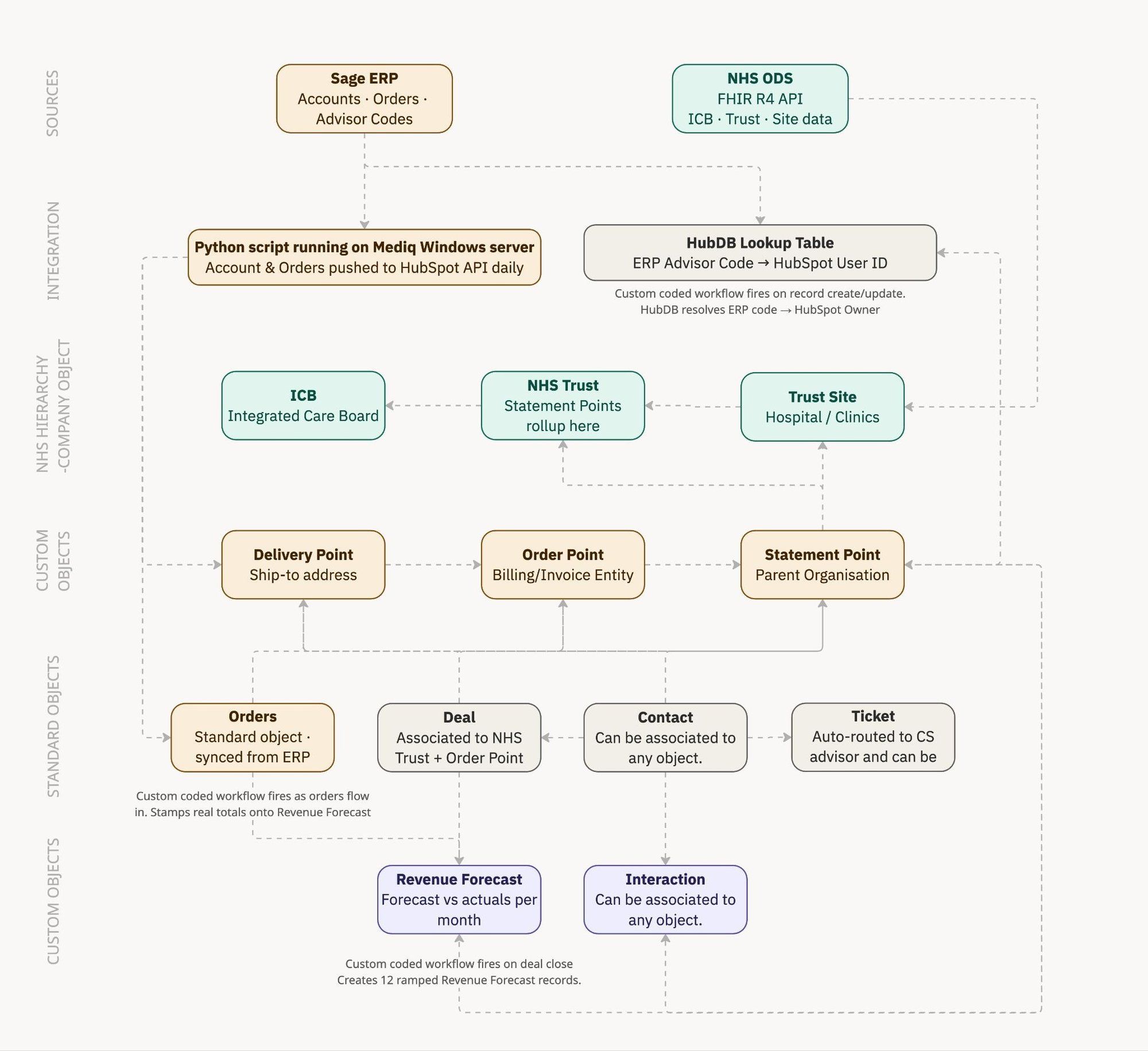
The first decision shaped everything else: build HubSpot around the client, not the other way around. Custom objects mirror their ERP hierarchy. A hand-built NHS organisational structure - drawn from NHS ODS API data - gives the sales team a navigable map of their entire addressable market, from Integrated Care Boards down to individual hospitals, with deals, contacts, and activity associated at the right level.
Custom ERP Integration
A custom Python script, written by Centralise and hosted on the client’s own server, keeps HubSpot and the ERP in sync. When a new customer is set up in the ERP, they’re pushed into HubSpot via the API. When an order is placed, it lands against the right account. No manual imports. No disconnected systems.
HubDB Lookup and Custom-Coded Workflow
The ERP stores a customer service advisor code against every account, but HubSpot has no idea what those codes mean.
Centralise built a HubDB lookup table mapping every ERP advisor code to its corresponding HubSpot user. A custom coded workflow fires on record creation and update, queries the table in real time, resolves the code to a HubSpot user, and sets ownership automatically.
The result: when a customer contacts the business - by email or form - HubSpot matches them to their account, reads the resolved owner, and assigns the ticket directly to the right CS advisor. No triage. No inbox-watching. To the advisor, a ticket simply appears in their queue, already assigned, already connected to the customer’s account and history.
Custom UI Extension
When a rep heads to a customer visit, they open the account in HubSpot. They can see the full picture: previous interactions, open tickets, orders and what was discussed last time.
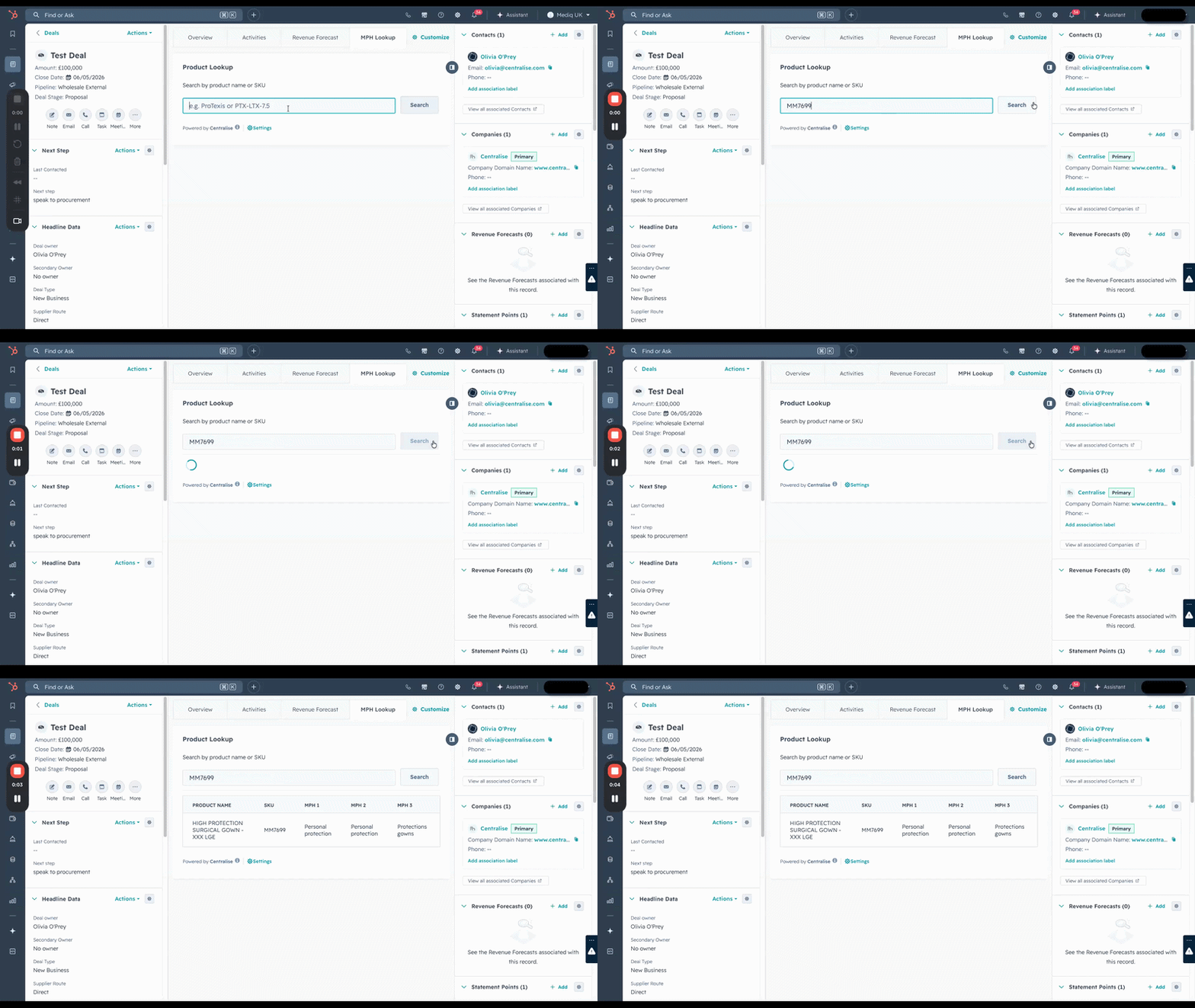
After the visit, they log which products were discussed. With a catalogue of 17,000+ SKUs, a standard dropdown is unworkable - so Centralise built a custom React UI Extension embedded inside the custom Interaction record. Reps search the full product catalogue by partial name or SKU, without leaving the record, to assign product categories.
Custom-Coded Forecast vs. Actuals Reporting
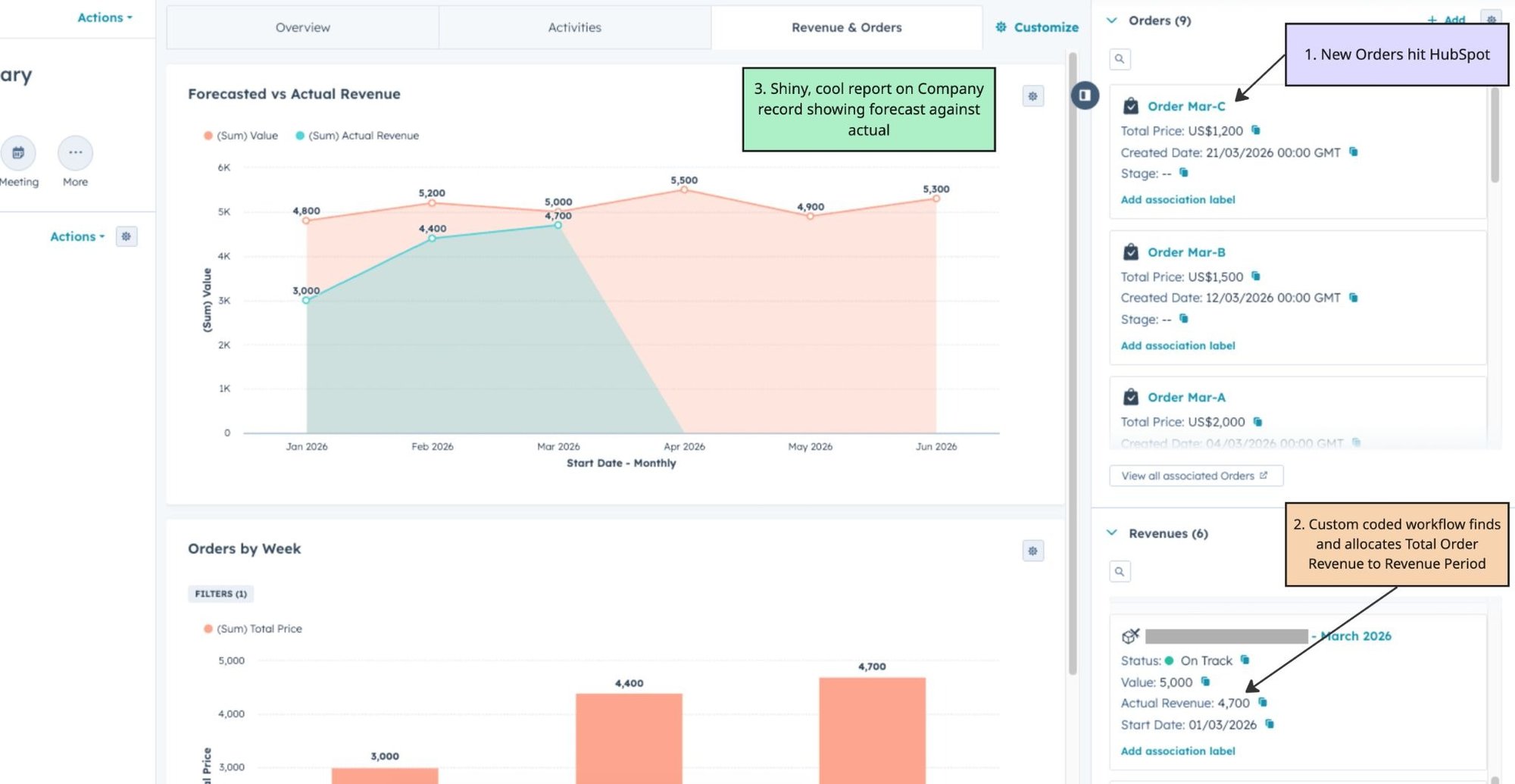
When a deal closes, a custom coded workflow automatically generates 12 Revenue Forecast records in HubSpot - one per month, with predicted figures ramped across the forecast horizon and attached to the relevant account. A second coded workflow handles the actuals side: as ERP order data flows in through the integration, it reads actual order totals per account per month and stamps the matching forecast record with the real number. HubSpot then shows forecast versus actual side by side, on every account, rolled up any way you need - by rep, territory, channel, or time period.
A business that had no CRM now has a commercial operating system built around the full complexity of what they do:
- Sales reps go into every customer meeting with context - order history, open issues, previous conversations.
- Managers have real-time visibility of their entire team’s activity in one place.
- Every inbound customer query is automatically routed to the right advisor.
- The contact centre has SLA data, case categorisation, and full ticket history per account.
- Forecast vs. actuals reporting gives leadership a consistent, reliable pipeline accuracy view - built into the CRM rather than pieced together manually each month.
And because every account has a complete history, every interaction is logged and categorised, and every ticket is associated with the right contact and owner, the business is now ready to begin leveraging HubSpot's AI features - including Breeze and Customer Agent. The data is clean. The structure is there. The next phase has somewhere solid to build on.